QR menu features for restaurant owners
Create a menu with food and drink photos, update prices yourself, and keep the same QR code. Guests scan to browse on their phones. Start your menu for free.
Beta 2.0
Lunch menus, seasonal designs and sales by menu
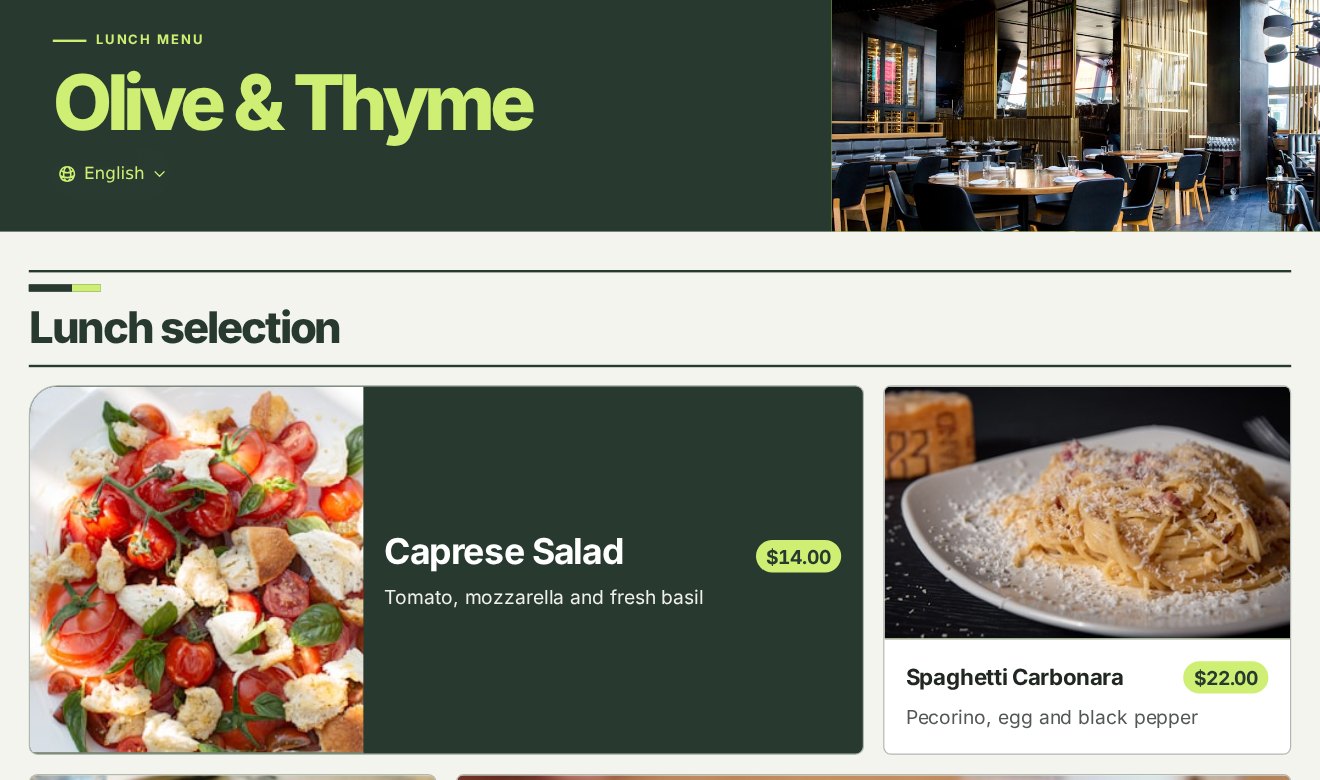
Menu collections and publishing
Create separate menus for lunch, dinner or special occasions. Publish or pause each one, and choose which published menu your restaurant’s QR code opens.
Menu designs
Choose a design to match your restaurant or the season. The layout adapts to phones, tablets and large screens.
Print table QR codes for ordering
Assign a published menu to each table. Guests who scan the table’s QR code see that menu in the design you chose. Free and Ad-Free support up to 30 tables per restaurant. Pro supports up to 100.
Collection and QR sign results
See how often each menu was opened and how much guests paid at the table. Every plan can download the report as an Excel file.
Dish catalog
Add dishes by hand, paste menu text or import a file. Upload a PDF of up to 5 pages, or a JPEG, PNG or WebP photo of your paper menu. Each file can be up to 10 MiB. Check the dish names, prices and variants in the draft, then select the items you want and confirm the import.
Collection QR
A collection QR opens its assigned collection. Edit the price in the draft and publish it. Guests can scan the same sign to see the new price.
Digital menu & QR codes
Create a menu with food and drink photos, update prices yourself, and keep the same QR code. Guests scan to browse on their phones. Start your menu for free.
QR code menu maker
Generate a QR code for your restaurant and for every table. Customers scan and browse instantly — no app to download.
Photo menu with descriptions
Show a photo, description and price for each dish so customers can understand what they are ordering.
25 dietary tags
Label items vegan, gluten-free, halal, nut-free and more — up to three tags each, translated everywhere.
Instant updates & sold-out toggle
Edit availability in the catalog. To change the price in a published collection, edit the draft and publish it when ready.
Public menu layouts
Choose a design for the restaurant, a modern menu or a seasonal collection. Pro includes premium layouts.
Table ordering & kitchen
Take orders from the table straight to the kitchen — no extra hardware.
QR table ordering
Each table gets its own QR code; guests browse and order from their phone. Free and Ad-Free now support up to 30 tables per restaurant, and Pro supports 100. All plans include unlimited menu categories and have no plan limit on kiosk orders or orders paid online.
Live kitchen display
Every pending item across all tables on one screen, sorted oldest-first — built for a kitchen tablet.
Per-item confirm / cancel
Manage each item individually; cancelled items drop off the bill and the total recalculates.
Request check & receipts
Guests request the check from their phone; print an 80mm thermal receipt with your logo.
Virtual queue & takeaway
Manage crowds and take takeaway orders without a separate app.
Virtual queue (dine-in & takeaway)
Customers reserve a number and ref code from their phone and watch the now-serving number live.
GPS distance gating
Reservations are allowed only when the customer is near your venue — no remote queue spam.
Takeaway order workflow
Guests place a takeaway order and pay online when the restaurant enables it, or pay at the counter when they collect their food.
Takeaway history & receipts
Re-print any past served order and search by ref code.
Analytics & reports
Know what sells, when, and how much you made — automatically.
Menu view tracking
See how many people view your menu, today / this week / this month.
Live sales
Real-time today's revenue, order count, and pending orders, refreshed automatically.
Daily sales reports
Advanced analytics, sales history and Excel export are free on every plan.
Team & languages
Run a real operation with a real team — in any language.
Role-based team access
Invite managers, chefs, waiters, and viewers with tailored permissions for each module.
19-language auto-translation
Translate the whole platform and your menu content — including right-to-left scripts — automatically.
Multiple restaurants
Free and Ad-Free support up to 3 restaurants per account; Pro supports up to 6. Each restaurant has its own menu, tables and team.
Create your free digital menu today
Create and share your core QR menu for free. Ad-Free · Remove public-menu ads; keep the Free features and limits. Pro · Hide “Powered by GetFreeMenu” on menus and receipts. Premium menu layout